
Getting started with ESUNT begins with understanding how the application manages secure connections, communication, and independent encryption. The complete ESUNT application is envisioned as a practical environment for private messaging, user-controlled security, and over-encrypted communication.
This guide introduces the intended initial setup, principal interface elements, and basic workflows. It provides an overview of how users would prepare ESUNT for everyday communication.
Understanding the ESUNT Interface
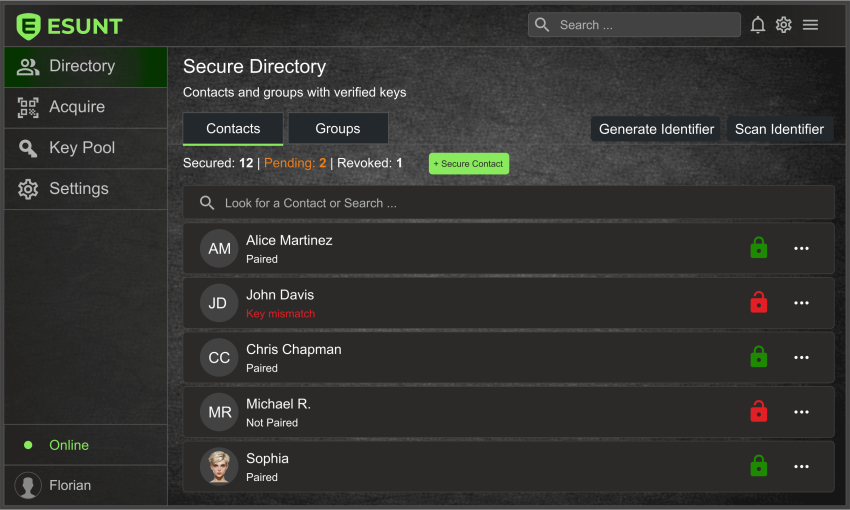
The ESUNT interface is designed to make advanced communication security accessible through familiar controls and straightforward navigation.
The complete application is envisioned to provide access to:
- Contacts - Organizing trusted communication partners and their secure connections.
- Conversations - Exchanging protected messages with individual contacts or groups.
- Security Controls - Managing encryption settings, secure connections, and protection status.
- Communication Features - Accessing supported messaging, file exchange, and other communication functions.
- Application Settings - Configuring preferences and managing the local application environment.
Initial Setup and Configuration
When the application becomes available, initial setup is intended to guide users through preparing their local ESUNT environment and reviewing the available security settings.
Before starting secure communication, users would:
- Initialize ESUNT and complete the required initial configuration.
- Review application preferences and available security options.
- Establish secure connections with trusted contacts using supported methods.
- Verify connection status before beginning protected communication.
The final setup sequence will depend on the implemented application and supported platform.
Establishing Your First Secure Connection
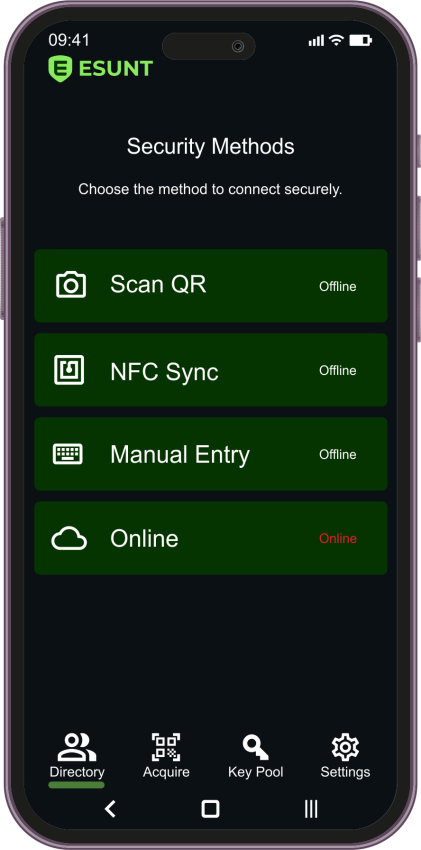
ESUNT is designed around independently established security relationships between communicating participants.
Depending on the available connection methods, users could establish these relationships through QR codes, NFC, Bluetooth, or manual information exchange.
Each relationship would provide the basis for an independently managed cryptographic context, separate from the underlying communication provider.
The next chapter, Contacts and Secure Connections, will explain these methods and the intended connection workflow in greater detail.
Choosing How to Communicate
The complete ESUNT concept supports two complementary ways of communicating:
- Standalone ESUNT - Using the dedicated application for protected messaging and other supported communication features.
- ESUNT with Existing Applications - Applying an additional encryption layer when communicating through compatible third-party platforms.
Both approaches are intended to give users independent control over an additional layer of communication security.
Learn more about the ESUNT Technology and its underlying principles.
Recognizing Secure Communication Status
ESUNT's proposed interface includes visual security indicators designed to help users recognize when independent encryption protection is active.
A padlock indicator is among the planned visual elements associated with protected communication. Users should be able to distinguish ESUNT-protected operations from ordinary application activity.
These indicators are intended to communicate the application's protection state, but they do not replace proper verification of trusted contacts and secure connections.
Security and Privacy Considerations
Even with independent encryption, responsible security practices remain important. Users should protect their devices, verify their communication partners, and understand the limits of local storage, backups, and data deletion.
ESUNT adds a proposed layer of cryptographic protection; it does not eliminate every communication or device security risk.