User Guide

Practical Examples and FAQs
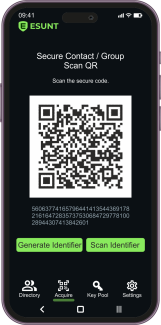
Explore practical ESUNT use cases and frequently asked questions covering private messaging, business communication, secure groups, protected file exchange, and privacy management.

Learn how ESUNT over-encryption is intended to work, how trusted connections are established, and what users should know about application compatibility, encryption keys, and security limitations.
Data and Privacy Management

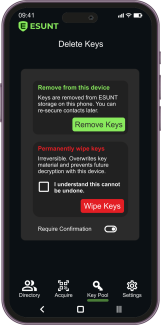
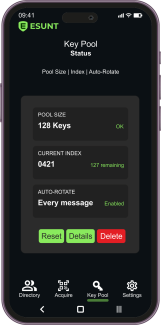
Explore ESUNT data and privacy management, including local information storage, soft deletion, hard deletion, and cryptographic key management. Learn how the envisioned application aims to give users greater control over protected communications and access to encrypted content.

Understand important privacy, backup, recovery, and data deletion limitations when using ESUNT and compatible communication platforms.

Managing ESUNT Security

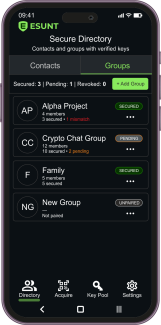
Learn how to manage ESUNT security, including cryptographic key-pools, key rotation, trusted connections, and encryption protection settings. Discover how the envisioned application supports multiple independent security relationships for contacts and groups.

Explore practical security controls designed to strengthen user-controlled, over-encrypted communication.

Using ESUNT with Other Applications

Learn how ESUNT over-encryption is designed to work with compatible messaging and communication applications. Explore the intended workflows for sending and receiving protected messages, managing secure connections, and verifying encryption status.

Discover how ESUNT could strengthen communication privacy without requiring users to abandon their preferred platforms.

Calls, Files, and Groups

Explore the planned ESUNT secure voice calls, protected file sharing, and private group communication features. Learn how independent over-encryption and user-controlled cryptographic relationships could help protect personal and professional communications.

Discover how the complete ESUNT application is envisioned to support trusted groups, confidential file exchange, and additional security across compatible communication platforms.

Secure Messaging

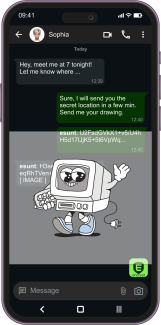
Discover secure messaging with ESUNT and learn how independently established encryption connections are intended to protect private conversations. Explore protected message exchange, conversation management, and visual security indicators.

Learn how ESUNT over-encryption could reinforce messaging privacy through its standalone application and compatible third-party communication platforms.

Contacts and Secure Connections

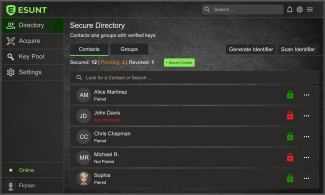
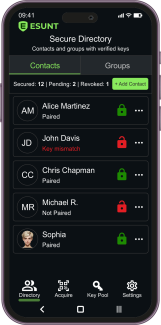
Learn how to add contacts and establish secure ESUNT connections using QR codes, NFC, Bluetooth, or manual information exchange. Explore trusted contact verification, independently managed encryption relationships, and connection security indicators.

Discover how the envisioned ESUNT application would help users manage private and secure communications with individual contacts and trusted groups.

Getting Started with ESUNT

Learn how to get started with ESUNT, from initial application setup and interface navigation to establishing trusted connections and managing independent encryption.

Explore the intended workflows for secure messaging, privacy settings, and over-encrypted communication through the complete ESUNT application and compatible third-party platforms.

How to Use ESUNT

Discover how to use ESUNT, the envisioned complete secure communication application. Explore its interface, secure contacts, private messaging, group communication, protected file exchange, and security management features.

This practical guide introduces the planned user experience of Standalone ESUNT and the use of independent over-encryption with compatible communication platforms.